I have created a new realm role using REST api. But in order to include role in access token I must also assign role to a client scope.
This is how to do it using GUI.
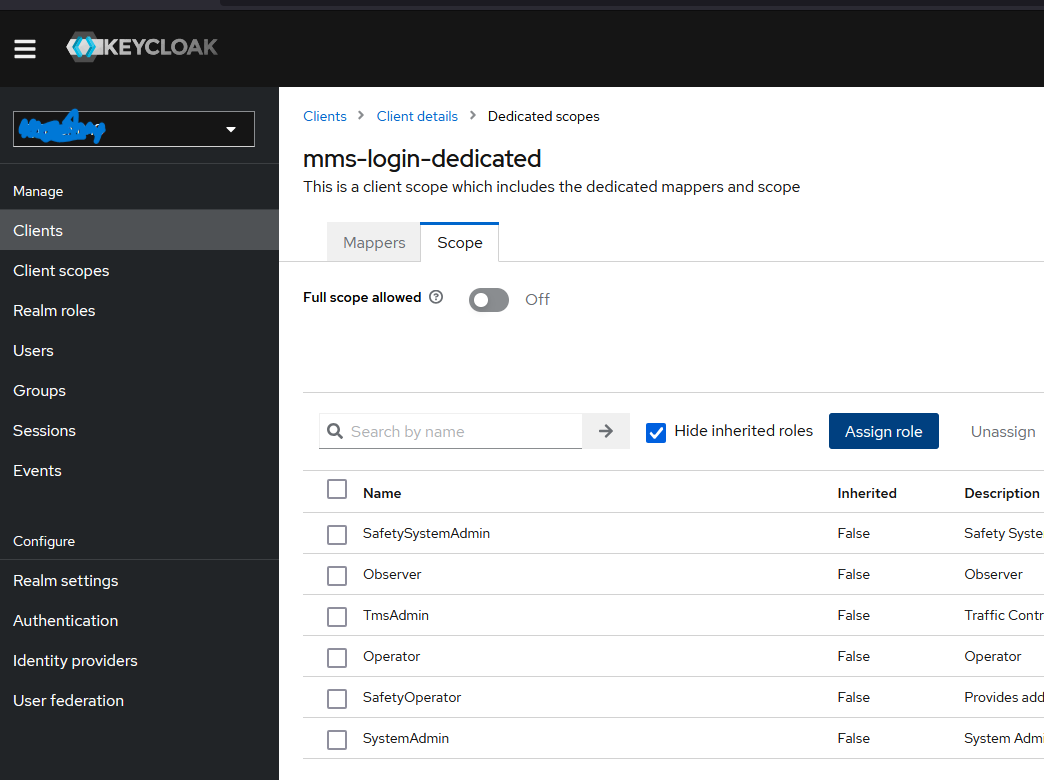
But how to do it using api? I am on 24.0.4 and using curl.
Hi @simmarn
I’m using keycloak v25.0.0 but I presume they don’t differ that much. Here is my solution:
curl --location 'http://localhost:8080/realms/dummy-realm/protocol/openid-connect/token' \ --header 'Content-Type: application/x-www-form-urlencoded' \ --data-urlencode 'client_id=dummy-client' \ --data-urlencode 'client_secret=Y4iTmfiqWSkjrDylL6biX3Q1UZxAO7ZN' \ --data-urlencode 'grant_type=client_credentials'
2.Obtain the Client Scope ID
curl --location 'http://localhost:8080/admin/realms/dummy-realm/client-scopes' \ --header 'Content-Type: application/json' \ --header 'Authorization: Bearer access_token'
curl --location 'http://localhost:8080/admin/realms/dummy-realm/roles' \
--header 'Authorization: Bearer access_token' \
--header 'Content-Type: application/json' \
--data '{
  "name": "dummy-role",
  "description": "blabla"
}'
curl --location 'http://localhost:8080/admin/realms/dummy-realm/roles' \
--header 'Authorization: Bearer access_token' \
--header 'Content-Type: application/json'
curl -X GET "http://localhost:8080/admin/realms/dummy-realm/client-scopes" \
-H "Authorization: Bearer {access_token}" \
-H "Content-Type: application/json"
5.2. list of protocol mappers for the client scope to avoid conflicts
curl --location 'http://localhost:8080/admin/realms/dummy-realm/client-scopes/<client-scope-id-from-previous-response>/protocol-mappers/models' \
--header 'Authorization: Bearer access_token' \
--header 'Content-Type: application/json'
5.3. Create Protocol Mapper with a hardcoded role
curl --location 'http://localhost:8080/admin/realms/dummy-realm/client-scopes/<client-scope-id>/protocol-mappers/models' \
--header 'Authorization: Bearer access_token' \
--header 'Content-Type: application/json' \
--data '{
  "name": "hardcoded-role-mapper4",
  "protocol": "openid-connect",
  "protocolMapper": "oidc-hardcoded-role-mapper",
  "config": {
    "access.token.claim": "true",
    "role": "dummy-role"
  }
}'
curl --location 'http://localhost:8080/realms/dummy-realm/protocol/openid-connect/token' \
--header 'Content-Type: application/x-www-form-urlencoded' \
--data-urlencode 'client_id=dummy-client' \
--data-urlencode 'client_secret=Y4iTmfiqWSkjrDylL6biX3Q1UZxAO7ZN' \
--data-urlencode 'grant_type=client_credentials'
obtain the access token and paste it in https://jwt.io you should be able to see the newly created role assigned to the client all via apis.
Thanks! What I was missing was the POST /{realm}/client-scopes/{id}/scope-mappings/realm endpoint.
I added a script like this where $WANTED_ROLE is the role role name.
  WANTED_ROLE_URL="$URL/admin/realms/EpirocMMS/roles/$WANTED_ROLE"
  echo $WANTED_ROLE_URL
  ROLE_INFO=$(curl --location --request GET $WANTED_ROLE_URL \
  --cacert $CERT_PATH \
  --header 'Content-Type: application/json' \
  --header "Authorization: Bearer $ACCESS_TOKEN")

   echo
   echo "-Action: Check if $WANTED_ROLE is mapped to client $CLIENT_NAME"
   SCOPE_MAPPINGS_URL="$URL/admin/realms/EpirocMMS/clients/$CLIENT_GUID/scope-mappings/realm"
   echo $SCOPE_MAPPINGS_URL
   SCOPE_MAPPINGS_FOR_CLIENT=$(curl --location --request GET $SCOPE_MAPPINGS_URL \
   --cacert $CERT_PATH \
   --header 'Content-Type: application/json' \
   --header "Authorization: Bearer $ACCESS_TOKEN")
   echo
   echo "Roles mapped to client $CLIENT_NAME:"
   echo $SCOPE_MAPPINGS_FOR_CLIENT
   echo
   if [[ $SCOPE_MAPPINGS_FOR_CLIENT == *$WANTED_ROLE* ]]; then
      echo "-Result: $WANTED_ROLE is mapped to $CLIENT_NAME. Nothing to do."
      exit 0
   else
      echo "-Result: $WANTED_ROLE does not exist."
   fi
   echo
   WANTED_SCOPE_MAPPINGS="${SCOPE_MAPPINGS_FOR_CLIENT/[/[$ROLE_INFO, }"

   echo "-Action: Update client-role mappings to:"
   echo $WANTED_SCOPE_MAPPINGS
   res=$(curl --location --request POST $SCOPE_MAPPINGS_URL \
   --cacert $CERT_PATH \
   --header 'Content-Type: application/json' \
   --header "Authorization: Bearer $ACCESS_TOKEN" \
   --data-raw "$WANTED_SCOPE_MAPPINGS")
   if test "$res" != ""; then
      echo "-Result: Could not map role: $res"
      exit 1
   else
      echo "-Result: Request to add $WANTED_ROLE to client accepted"
   fi